

Precision Online Manual
Game Elements
Player

This is you.
Goal


Left - closed, Right - opened
The goal is initially closed. When all targets has been hit, the goal is opened
Target

Hit all targets with a ball to activate the goal.
Switch-target
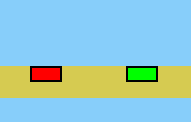
Left - Off, Right - On
An alternative target. Unlike regular targets, they are set to on or off. When they're hit by
the ball, they switch from on to off or vice versa. All switch-targets must be set to on for the
goal to be activated.
Elevator

Moves vertically or horizontally. Use them for transport.
Spring

Use this for an extra powerful jump.
Spikes

Avoid these. If you touch them it's game over. If a ball hits them, the ball is destroyed.
Water

If a ball hits them, the ball is destroyed. But it's not dangerous to the player.
How to play
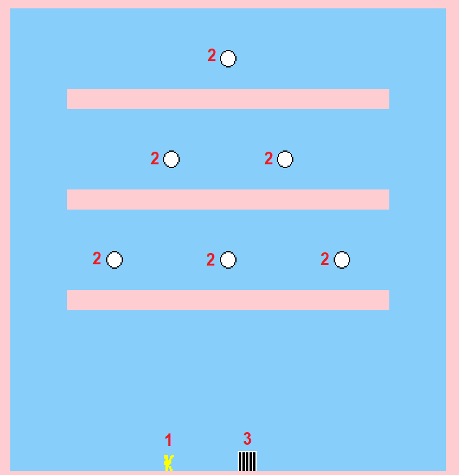
Above is a typical level. 1 is the player, 2 are targets and 3 is the goal.
Every level has a number of targets and a goal. The goal is initially inactive. When all targets has been hit, the goal is activated. Once it's activated, move to the goal to complete the level.
Use the keyboard and mouse to play. Use W or left arrow key to move left, use D or right arrow key to move right. Use Space to jump.
To hit a target, you need to shoot a ball at it. Aim using the mouse. Hold left mouse button to shoot. The longer you hold the mouse button, the faster the speed the ball will be launched with. If you hold it long enough to reach the maximum speed, the ball will automatically launch.
Only one ball can be active at any given time. If you launch another ball, the previous ball will be destroyed

On the top of the screen some information is displayed.
1. Timer
2. Number of targets you've hit and how many that are left
3. Number of balls used and how many you have left
4. Time limit
5. Your best time for this level
6. World record time for this level
First time playing
From the main menu you can select either of two game modes: Practice and Challenge.
Practice allows you to try out the levels with no time limit and with an unlimited number of balls. It's a good idea to first practice some.
When you feel you're ready, you can select the Challenge game mode. Here you have a time limit and/or a limit on the number of balls you can use (depending on the level). If you complete the level without exceeding the regular limits, you will achieve a bronze medal. To achieve silver and gold the limits are even stricter. The limits for each medal is shown when you hover with the mouse over the level name in the menu.
Controls
Move left - W or LEFT ARROW
Move right - D or LEFT ARROW
Fire - Left mouse button
Use mouse to move the aim
P - Pause game
ESC - Go to menu (or go to game if in menu)
F4 - Restart level
F5 - Toggle sound on/off
F7 - Volume down
F8 - Volume up